Using a C library in an Xcode project without Swift Package Manager
By Kenneth Chew • Posted March 16, 2026
For one of my projects implementing ext4 on Mac, I needed to use the CRC32C checksum algorithm, which is used for many of ext4’s data structures.
My project is written in Swift and structured as an Xcode project, so naturally I first looked for libraries that work with the Swift Package Manager. Numerous options implementing CRC32C exist, many of which are written in Swift itself, but the ones I found use a software implementation. Most modern CPUs have hardware support for this, and given that this is for a file system driver, I wanted to take advantage of hardware acceleration.
The best library I found that meets these requirements was Google’s CRC32C, written in C++. Swift and C++ are able to work together in the same codebase. However, the library doesn’t support Swift Package Manager and was built with CMake, so adding it was a bit of a challenge.

First, I created a framework target called “CRC32C”, set the language to Objective-C, and put the crc32c repo as a submodule in a subdirectory of that framework target. The use of CMake made it so that simply dropping the source files into the project in a framework target wouldn’t compile in Xcode. It turns out that CMake’s use here is relatively simple, and mainly does two things:
- Configures the
src/crc32c_config.h.infile, which has various config options that control options such as the architecture and whether to use hardware acceleration - Links to other libraries like
glogandgoogletestfor use in tests and benchmarks
Both parts were relatively easy to work around. I used CMake in an initial manual build to get the configured crc32c_config.h. Then, I added the configured header to the project’s include directory and set the options manually. In Google’s case, the library needs to work much more generically across many platforms, but in my case, I know that this build just needs to work on Macs.
Today, there are two architectures I need to build for: x86_64 (Intel-based) and arm64 (Apple Silicon, e.g. M1 and friends). Thus, the built library would ultimately need to be a universal binary and build appropriate artifacts for both architectures automatically. The simplest way to apply the correct config options to each was to just use preprocessor directives:
/// ...
// Define to 1 if targeting X86 and the compiler has the _mm_crc32_u{8,32,64}
// intrinsics.
#if (defined(_M_X64) || defined(__x86_64__))
#define HAVE_SSE42 1
#else
#define HAVE_SSE42 0
#endif

// Define to 1 if targeting ARM and the compiler has the __crc32c{b,h,w,d} and
// the vmull_p64 intrinsics.
#if defined(__arm64__) && __ARM_FEATURE_CRC32
#define HAVE_ARM64_CRC32C 1
#else
#define HAVE_ARM64_CRC32C 0
#endif
/// ...
Then, I needed to remove the dependencies on glog and googletest. Since these were only used for the tests and benchmarks, for this purpose, I could just remove the test and benchmark files from any compile steps in the Xcode target1… and it just worked!
…
Not fully, though. It worked when building only for ARM. However, for the Intel build (and the universal build), there was a flood of errors related to missing target features:
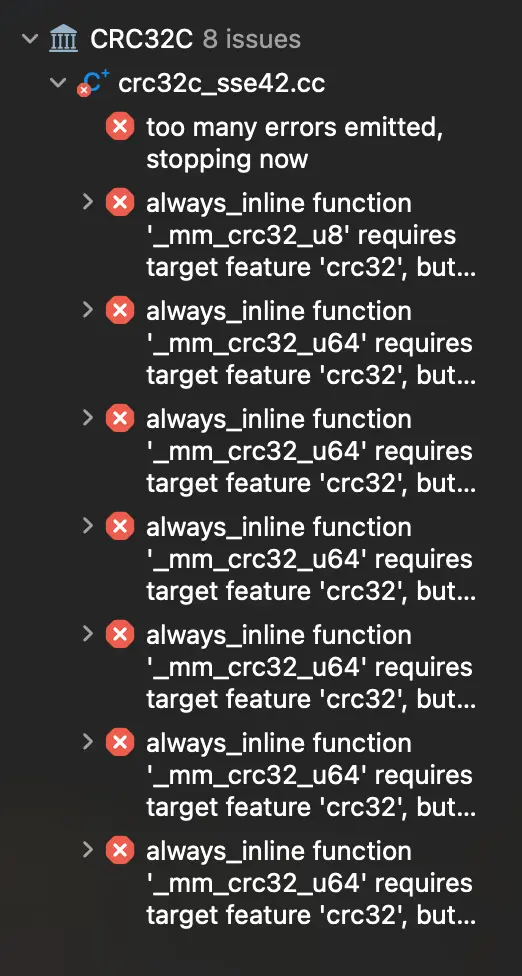
The errors were all of the form
always_inline function ‘_mm_crc32_u8’ requires target feature ‘crc32’, but would be inlined into function ‘ExtendSse42’ that is compiled without support for ‘crc32’
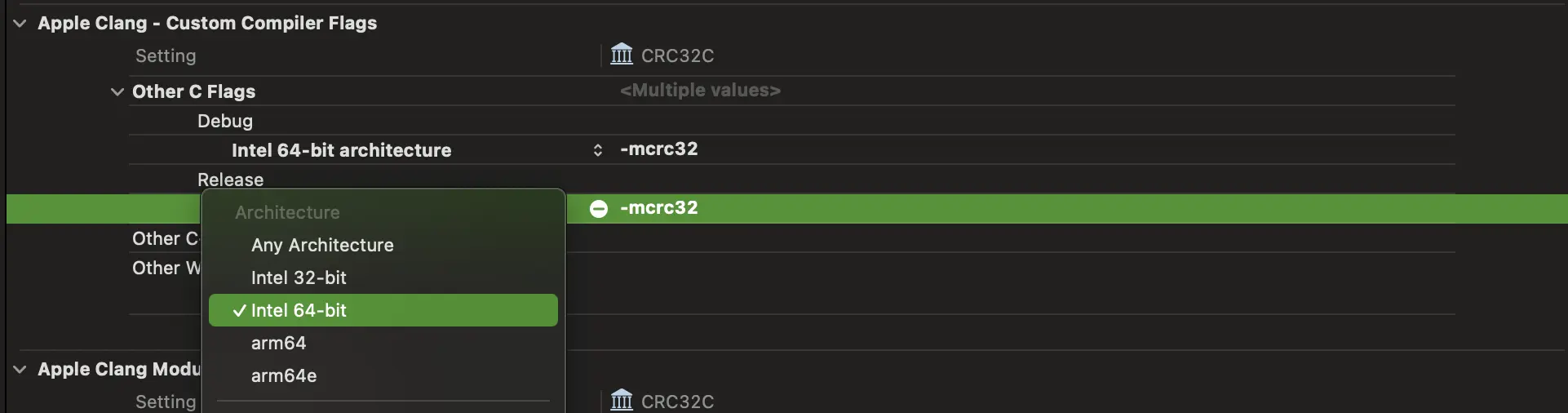
The fix here was to add the -mcrc32 flag to the build. I did this by adding it to the “Other C Flags” in the build settings, but only for the Intel 64-bit architecture (for the arm64 target, this doesn’t exist and thus would cause the build to fail).2 After that, it built successfully.
Finally, I added the include/crc32c.h header to the public headers list in the target’s build phases and imported it in the umbrella header to expose the library’s API to Swift.
// CRC32C.h

#import <Foundation/Foundation.h>

//! Project version number for CRC32C.
FOUNDATION_EXPORT double CRC32CVersionNumber;

//! Project version string for CRC32C.
FOUNDATION_EXPORT const unsigned char CRC32CVersionString[];

// In this header, you should import all the public headers of your framework using statements like #import <CRC32C/PublicHeader.h>
#import <CRC32C/crc32c.h>
Then it’s just a matter of replicating this framework target into my actual project:
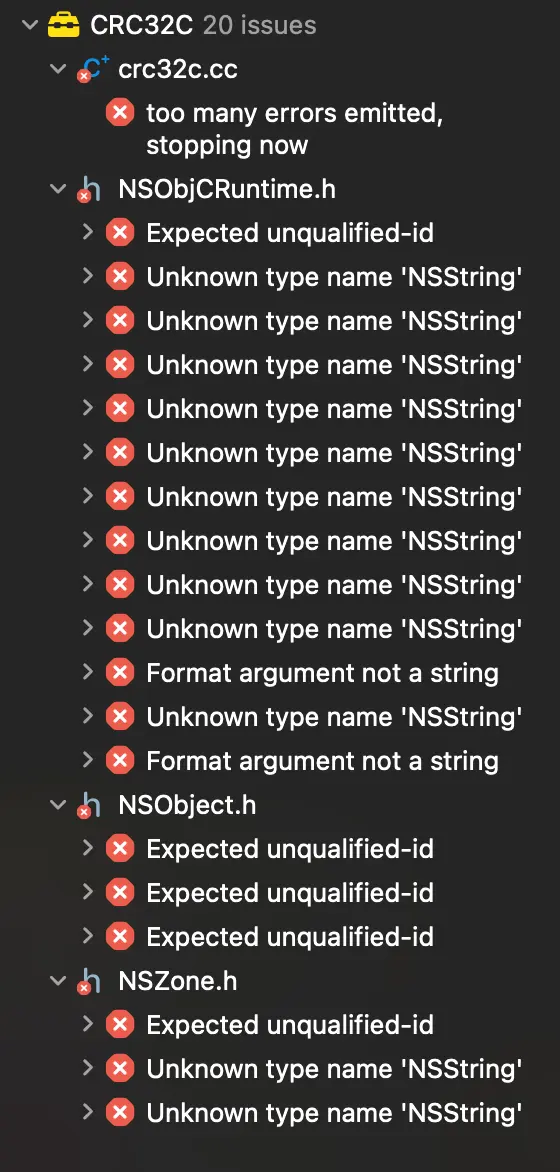
Huh?
It turns out that the library’s crc32c.h header exposes its public API, but I also ended up naming my target CRC32C and thus my umbrella header was also named CRC32C.h. The name collision caused an issue, even though they were in separate directories. In some cases I’ve seen different errors from this, but it just seems to generally cause weird behavior.
When inspecting the built framework, it seems like all of the public headers are added to the bundle’s Headers directory and the directory structure isn’t kept, so only one of the headers would be intact. I assume that the Obj-C header, which imports Foundation, was being included by the C library’s code instead of the correct header. Then, the C code can’t handle the Objective-C syntax, leading to strange errors in NSObjCRuntime.h like Expected unqualified-id, Unknown type name 'NSString', and Format argument not a string.
I renamed my target to GoogleCRC32C and the umbrella header to match, and finally:
import GoogleCRC32C

extension Data {
    func crc32c(seed: UInt32? = nil) -> UInt32 {
        self.withUnsafeBytes { buf in
            guard let base = buf.baseAddress?.assumingMemoryBound(to: UInt8.self) else { return 0 }
            if let seed {
                return crc32c_extend(seed, base, buf.count)
            } else {
                return crc32c_value(base, buf.count)
            }
        }
    }
}

/// ...in my data structure...
func calculateChecksum(seed: UInt32) throws -> UInt32 {
    let data = try self.toData().dropLast(MemoryLayout<UInt32>.size)
    return ~data.crc32c(seed: seed)
}

1 Wish I could do that for any code that annoyed me.
2 Unfortunately, this ended up being one of the main reasons I couldn’t just wrap the library with the Swift Package Manager. As far as I can tell, while you can specify custom build flags, there’s no way to specify architecture-specific flags, and thus no way around this build error when using SPM.